It is important to keep your billing information on your Smaart Subscription up to date. If the auto-renewal fails, the license will expire and you will no longer be able to use Smaart. See this article for more information.
First, log into your https://my.rationalacoustics.com account. Once logged in, click "Software Licenses". From here, you can click "Billing" next to your Subscription license to be brought to your payment information page.

The Software Licenses Page
Alternatively, you can click on your license to view your license info. When viewing your license, clicking "Manage" will also bring you to your billing information.
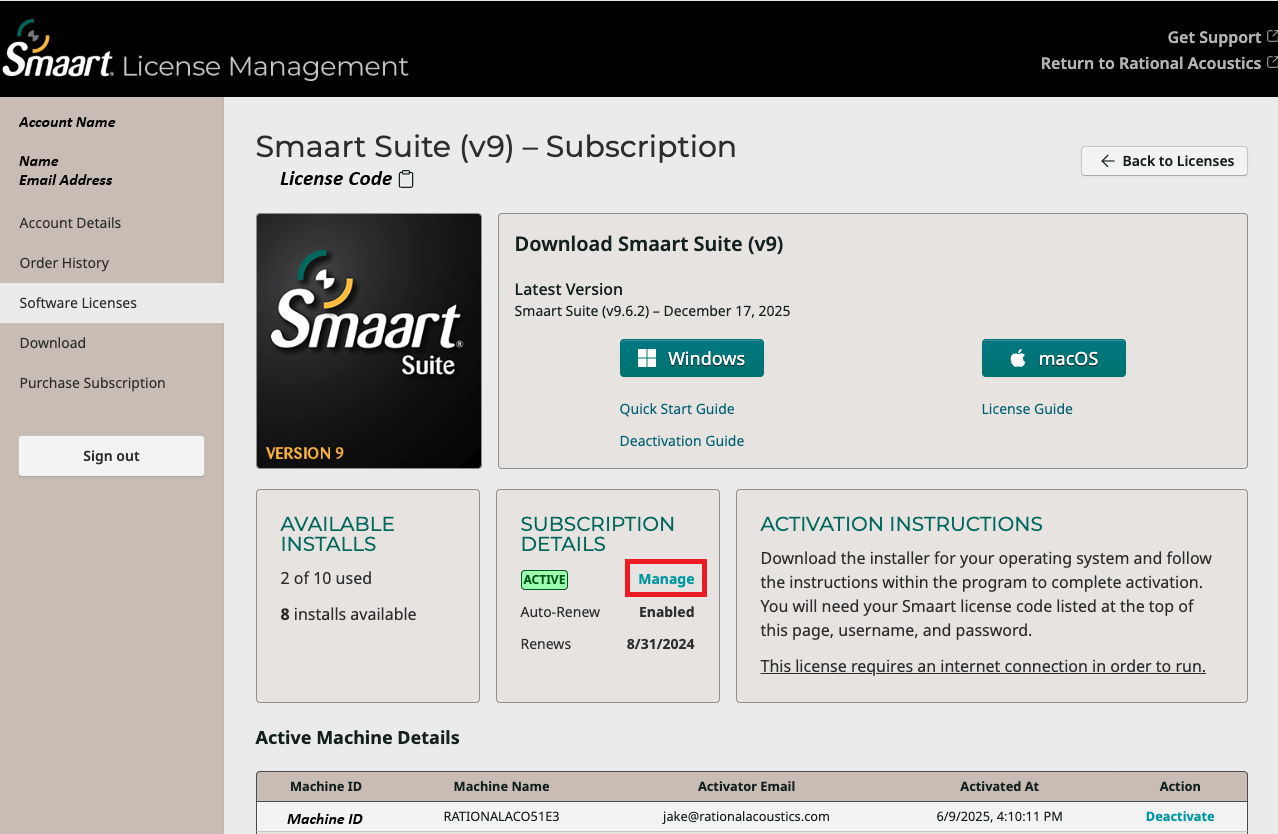
Smaart Suite Subscription License Page
The Subscription Management page should look similar to the image below. The link at the bottom allows you to update your information, while the "Cancel plan" button will disable auto-renewal but will allow you to continue using Smaart for the remainder of the subscription period.

Subscription Management, Main Page
Clicking "Update information" brings you to a page where you can edit your billing info. The only required fields are email address and billing address, however you can optionally enter a phone number and a Tax or VAT ID. Please make sure to click the Save button at the bottom or your changes will be lost!
If you are in the EU, please note that you will be charged VAT on your subscription renewal if you do not enter a valid VAT ID.

Update information page
Was this article helpful?
That’s Great!
Thank you for your feedback
Sorry! We couldn't be helpful
Thank you for your feedback
Feedback sent
We appreciate your effort and will try to fix the article